The ad-ridden calculator websites you have been avoiding on Google? You can replace them with your own clean version in about 40 minutes, using an AI you already have access to, without writing a single line of code.
The 40-minute answer
Build a calculator website with Claude AI in three stages: prompt Claude to generate the calculator as an HTML artifact, customize it through conversation, then deploy the file to a free static host. Total time runs from 40 minutes for a single-purpose calculator to roughly two hours for a polished one with input validation, mobile styling, and a custom domain. Cost runs from zero, on the free Claude tier and the free static hosts, to about $20 a month if you want Claude Pro for heavier iteration. The whole pipeline ships from one chat window and one drag-and-drop upload.
| Method | Cost | Time to ship | Complexity ceiling | Best for |
|---|---|---|---|---|
| Method 1: Claude Artifacts | $0 (free tier) or $17–$20/mo (Pro) | ~40 min for first calculator | Single-page HTML calculator with vanilla JS | One-shot calculators, fast iteration in chat |
| Method 2: Claude Code | $17–$20/mo (Pro) or $100–$200/mo (Max) | ~1 hr per multi-page set | Multi-calculator sites with shared layout, build steps, version control | Calculator sites, repeated work, GitHub-deployed projects |
What you will need before starting
Three things, none of them code.
A Claude account. The free tier handles a basic calculator. If you plan to iterate on the design through twenty back-and-forth turns, you will hit the free tier’s usage cap and want Claude Pro at $17 a month billed annually or $20 monthly. Pro also unlocks Claude Code and the persistent-storage artifact features that the free tier does not get.
A static host account. Tiiny Host, Netlify, Cloudflare Pages, and Vercel all run free tiers that comfortably hold a single HTML calculator. We will compare them later. For now, sign up for one. Tiiny Host needs nothing but an email; the others tie to a GitHub account if you want one-push deploys.
A clear specification of what you are building. Not a wireframe. A sentence. “A mortgage calculator that takes loan amount, interest rate, and term in years, and returns monthly payment plus total interest paid.” The calculator nobody else has is the one you actually use. Skip the generic ones; pick the niche your audience needs.
That is it. No code editor. No GitHub repository. No build pipeline.
Method 1: The Artifacts route, fastest for one calculator
Open Claude.ai, start a new chat with a Pro or free account. Type your specification. Use this template, swapping the bracketed parts:
Build a calculator that takes [inputs in plain language] and returns [outputs in plain language]. Use a single HTML file with inline CSS and vanilla JavaScript. No external libraries. Style it clean and minimal with a [your color] accent. Make it mobile-responsive.
Claude generates the calculator as an Artifact, which is its term for self-contained interactive code. Anthropic’s own description: “Artifacts enable users to turn ideas into shareable apps, tools, or content—build tools, visualizations, and experiences by simply describing what you need.” The threshold for triggering an artifact is content that is “significant and self-contained, typically over 15 lines.
The artifact panel opens on the right side of your conversation. The calculator runs live in that panel. Click the buttons. Type values into the input fields. If a number formats wrong, ask Claude to fix it. If the layout breaks on mobile, ask Claude to add a media query for screens under 480 pixels. Each request rewrites the artifact in place; the panel updates within a few seconds.
This is the loop. Specification, render, test, refine. Most calculators stabilize after five to eight turns. The blocker is almost never Claude’s ability to write the code. The blocker is your ability to articulate exactly what “broken” means when something looks off.
Once the calculator behaves, copy the HTML out of the artifact panel. Paste it into a text file on your machine, save it as calculator.html. You now have a deployable file.
Method 2: The Claude Code route, for multiple calculators
If you want to build a calculator site, not just one calculator, switch to Claude Code. This is Anthropic’s terminal-based agent, included in Pro and Max but not Free.
Anthropic describes Claude Code as “an agentic coding tool that reads your codebase, edits files, runs commands, and integrates with your development tools. Available in your terminal, IDE, desktop app, and browser.” For a calculator-site project, that translation is: Claude Code generates and edits multiple HTML files inside a folder, can wire up shared CSS and a navigation menu, and runs whatever build commands you tell it to. It does not replace your judgment on layout or copy. It removes the manual file shuffling.
Install it once, then invoke it inside a project folder. On macOS, Linux, or WSL: curl -fsSL https://claude.ai/install.sh | bash. On Windows PowerShell: irm https://claude.ai/install.ps1 | iex. Run claude from your terminal in the project folder and start describing the site.
A typical first prompt: “Build a calculator site with three calculators: mortgage, car loan, and tip. Each one is its own HTML page. Share a header and footer across all three. Match the styling to the [color] palette. Output a folder I can drop into Netlify.”
Kaizen AI Consulting wrote up a case study where they used Claude Code to build a customer quote calculator for UK trades businesses in a documented one-hour breakdown: 10 minutes on requirements, 5 minutes on the prompt, 15 minutes on code review, 15 minutes on testing, 15 minutes on deployment. That timing maps to most multi-calculator builds I have seen in practice. The Artifacts route is faster for one calculator. Claude Code overtakes it the moment you cross two.
If you are weighing which Claude tier to pay for, the real ranking of top frontier AI models for April 2026, beyond marketing headlines covers the Sonnet 4.6 vs Opus 4.7 vs Haiku 4.5 trade-offs that determine what your money actually buys.
The ideal prompt structure for calculators
Most calculator builds fail at the prompt, not at Claude. The failure mode is vague specification. “Build me a mortgage calculator” gets you whatever Claude defaults to. “Build me a mortgage calculator that takes loan amount in dollars, annual interest rate as a percentage, and term in years, and returns monthly payment, total interest paid over the life of the loan, and a visual amortization breakdown by year” gets you the calculator you actually wanted.
Five elements, in this order:
Inputs. Name each one. Specify the unit. “Loan amount in dollars” not “loan amount.” Claude will pick a unit if you do not, and it might not be the one your users use.
Calculation. State the formula plainly, or state the source of truth. “Standard amortization formula” works. So does naming the U.S. mortgage interest formula explicitly. Naming the formula prevents Claude from guessing.
Outputs. Name each one. Say what to do with edge cases. “Round to two decimal places. Show ‘invalid input’ if any field is empty or negative.”
Style. Pick a palette. Pick a font family. Specify mobile behavior explicitly. “Mobile-first, single column under 600px wide, two columns above.”
Constraints. No external dependencies. Inline CSS and JavaScript. One file. Static. These four constraints turn what Claude builds into something a static host can serve without a build step.
The prompt is the spec sheet. Write it like one. The Sales Labs team documented their own ROI calculator workflow with Claude using a Context-Role-Task-Format prompt structure followed by iteration on calculation sources, variable reduction, and disclaimer adjustments. That iteration phase is where the calculator becomes good. Plan for ten to fifteen turns of refinement after the first version renders.
Design and UX choices that decide whether anyone uses it
Three things separate a calculator that works from one that gets used.
Default values. Pre-fill every input with a sensible number. A mortgage calculator with empty fields makes the user do work before they see anything. A mortgage calculator pre-filled with $400,000 at 7.5% over 30 years tells them what kind of question this answers, before they type. Then they tweak.
Live updates, not a button. Recompute on every keystroke. Buttons feel like form submission; calculator users want continuous feedback. JavaScript makes this trivial; ask Claude to add oninput handlers rather than a submit button.
One-line explanation under each input. Not tooltips. Not modals. A 12-pixel grey line directly under the field saying “annual rate, e.g. 7.5 for 7.5%.” This single change cuts user confusion by a wide margin and costs you 30 seconds of prompting.
A useful analogy: the difference between a calculator that gets bookmarked and one that gets closed is the same as the difference between a good kitchen scale and a bad one. Both weigh things. Only one tells you what units it expects, defaults to a sensible setting, and updates the moment you put something on the platform.
Deployment options ranked by what actually matters
Four free static hosts are worth knowing. Each has a sweet spot.
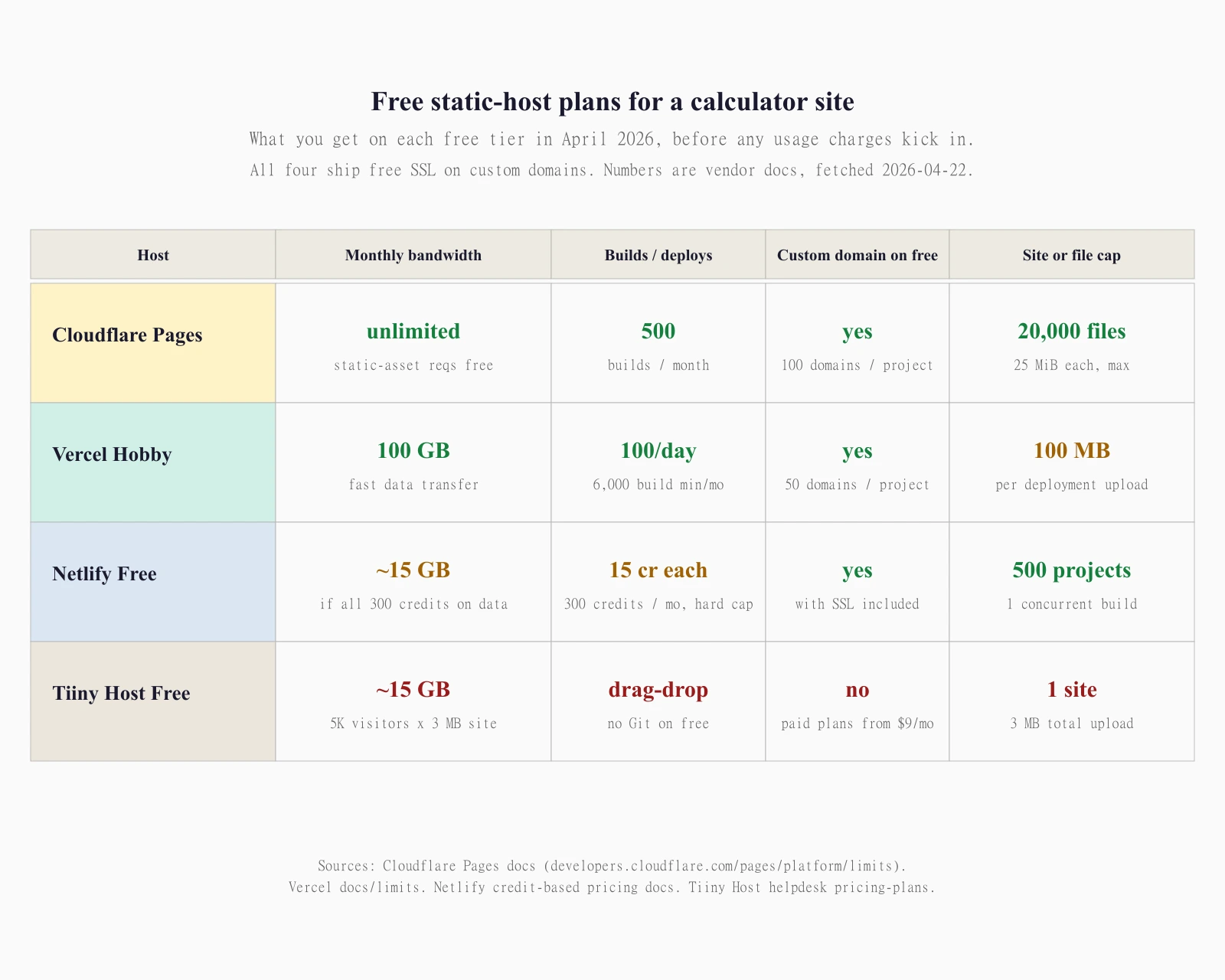
Tiiny Host is the fastest path from HTML file to live URL. Drag the file onto the upload zone, get a https://yoursite.tiiny.site URL in under a minute. The free tier holds one site at three megabytes total, shows Tiiny Host branding, and keeps the link online indefinitely “as long as you log into your account once every month” per Tiiny’s documentation. No custom domain on free, no Git integration. Paid tiers start at $9 a month (or about $5 a month billed annually) and unlock custom domains, more sites, and bigger file caps. Best for: testing your calculator with friends before you commit to a long-term host.
Cloudflare Pages is the most generous free tier on bandwidth. Cloudflare advertises unlimited bandwidth and unlimited static-asset requests on the free plan. The hard limits are 500 builds per month, 20,000 files per site, 25 MiB per file, 100 custom domains per project, and a soft cap of 100 projects per account. Connect a GitHub repository, push code, get a build. Best for: a calculator you expect to actually go viral, where bandwidth is the variable that matters.
Vercel Hobby is the smoothest workflow if you have ever touched Next.js. The free tier ships 100 GB of fast data transfer, 6,000 build execution minutes, 100 deployments per day, 200 projects, one concurrent build, fifty domains per project, and a 100 MB per-deployment file ceiling. Best for: a site you plan to extend with React or interactive components later.
Netlify changed its pricing model in September 2025. The free plan now grants 300 credits per month with a hard cap and no auto-recharge. Each production deployment burns 15 credits; bandwidth burns 20 credits per gigabyte transferred; web requests burn 2 credits per 10,000. Custom domains with SSL are included, and the project allowance is 500. Best for: a static calculator with low traffic where the credit math comfortably fits in 300 a month. Above that, the credit consumption can sneak up on you, and Cloudflare Pages becomes the better default.
All four ship free SSL on custom domains. All four except Tiiny Host integrate with GitHub for auto-deploy on push.
Adding the calculator to an existing website
If you already have a WordPress site, a Webflow site, or a Squarespace site, you do not need to host the calculator separately. You have two choices.
Embed via iframe. Host the calculator on Tiiny Host or Cloudflare Pages, get the URL, and paste an iframe tag into your existing page: <iframe src="https://your-calculator.pages.dev" width="100%" height="600" frameborder="0"></iframe>. The calculator renders inside your page. Mobile responsiveness depends on how you size the iframe. This route keeps the calculator deployable independently from your main site, which matters if you change CMS later.
Paste the HTML directly into a custom HTML block. WordPress (Gutenberg’s HTML block), Webflow (Embed element), and Squarespace (Code block) all accept raw HTML and JavaScript. The calculator becomes part of your page DOM. SEO benefit: the calculator’s content sits on your domain, not an iframe. Cost: if the calculator’s CSS conflicts with your theme, you will spend an hour resolving specificity issues.
For most cases, the iframe is the lower-risk default. The HTML-block route is worth it only when you specifically want the calculator’s content indexed under your main domain.
Common mistakes to avoid
Letting a chat thread run too long. If your prompt thread has crossed forty turns, start a new chat and paste the current calculator code in as context. Claude’s context window is huge, but coherence on a single thread degrades when half the messages are “no, the other one.”
Building one giant calculator instead of three small ones. A “universal financial calculator” with thirty inputs is harder to build, harder to use, and impossible to rank for. Three single-purpose calculators (mortgage, car loan, refinance) are three pages, three URLs, three keyword targets, and three opportunities for Google to find you.
Not testing on a real phone. The artifact preview in Claude is a desktop browser at desktop dimensions. The actual user is on an iPhone in landscape with a thumb. Open the deployed URL on a phone before you call it done.
Trusting the math without sanity-checking. Claude writes correct calculator math most of the time. Most is not all. Run a known input, compare against a published reference (Bankrate, Investopedia, your bank’s calculator). If your $400,000 mortgage at 7.5% over 30 years comes out to anything other than roughly $2,797 a month, the formula is wrong.
Adding monetization, honestly
A calculator site can earn money in three ways. Each one trades reach for revenue per user.
Display ads via Google AdSense. This is the standard route for high-traffic informational sites. Approval requires the site to show original content, navigation, a privacy policy, and enough meaningful pages of content to look like a real site rather than a thin landing page (AdSense’s own program policies are the primary source on what counts). RPM (revenue per thousand pageviews) for finance and calculator content runs higher than general content but varies by traffic geography. A mortgage calculator visited mostly by U.S. desktop users earns multiples more per pageview than the same calculator visited mostly from low-RPM regions.
Affiliate links. A mortgage calculator can sit next to a “compare mortgage rates” affiliate widget from one of the major loan-comparison networks. A car-loan calculator can link to auto-loan affiliate offers. Affiliate earns less per pageview than display ads in some niches and far more in others. Test both.
Lead capture. The B2B model. The calculator collects an email in exchange for the saved result, which feeds a CRM and a sales motion. ROI calculators in particular pull this off well; consumer calculators rarely do.
What none of these models will tell you up front: getting traffic is the actual hard part. The calculator itself is the easy part. Pick a niche where you have an unfair distribution advantage (an existing audience, a real-world referral source, a niche keyword nobody good has bothered to target) before you spend a weekend on the build.
Frequently asked questions
Can I really build a calculator website without writing any code?
Yes, for the calculator itself. You will still need to copy and paste the generated HTML, drag-and-drop a file to a host, and possibly point a domain name. None of that is code in the sense of writing functions or debugging compilation errors. If you can use email and drag a file from a folder to a browser, you can ship a calculator built with Claude.
Which Claude plan do I need?
Free works for a single calculator built in one or two sessions. Pro at $17 a month billed annually or $20 monthly is the right call if you plan to iterate, build multiple calculators, or want Claude Code. Max from $100 to $200 a month buys you 5x or 20x the Pro usage allowance and is overkill unless you are building dozens of calculators or running other heavy Claude workloads.
How much does the deployment cost?
Zero, in most cases. Tiiny Host’s free plan, Cloudflare Pages’s free plan, Vercel Hobby, and Netlify’s free credit pool all hold a single static calculator. You only pay if your traffic outgrows the free tier or you want a custom domain on Tiiny Host (paid tiers start at $9 a month).
Can the calculator save user data?
Yes, in the user’s own browser via localStorage. No server required. Ask Claude to add localStorage support to the calculator and it will write the dozen lines of JavaScript that persist user inputs across visits. If you want server-side saving (a database, an authenticated dashboard), the static-host model breaks; you will need a backend, which is a separate project.
Will Google index a Tiiny Host or Cloudflare Pages URL?
Yes. Both serve standard HTML with crawlable content. Whether Google ranks it is a separate question that depends on your content quality, link profile, and competition for the target keyword. The host does not block indexing.
Can I use Claude Artifacts for free?
Yes. Free-tier accounts can create artifacts and copy code out of the artifact panel. Advanced features like persistent storage and MCP integration require Pro, Max, Team, or Enterprise per Anthropic’s documentation. For a basic calculator that lives entirely in HTML and JavaScript, free-tier artifacts are sufficient.
Should I use Method 1 (Artifacts) or Method 2 (Claude Code)?
Use Artifacts for one calculator. Use Claude Code for two or more, or any time you want shared headers, navigation, or a build folder you can deploy as one unit. Claude Code requires Pro or Max; Artifacts works on Free.