The HTML5 game you have been meaning to build has been thirty minutes of typing away the entire time. Open Claude Code, describe the game in plain English, and watch a working browser game appear in a single file you can drag onto a host. No engine. No build step. No app store review.
The afternoon answer
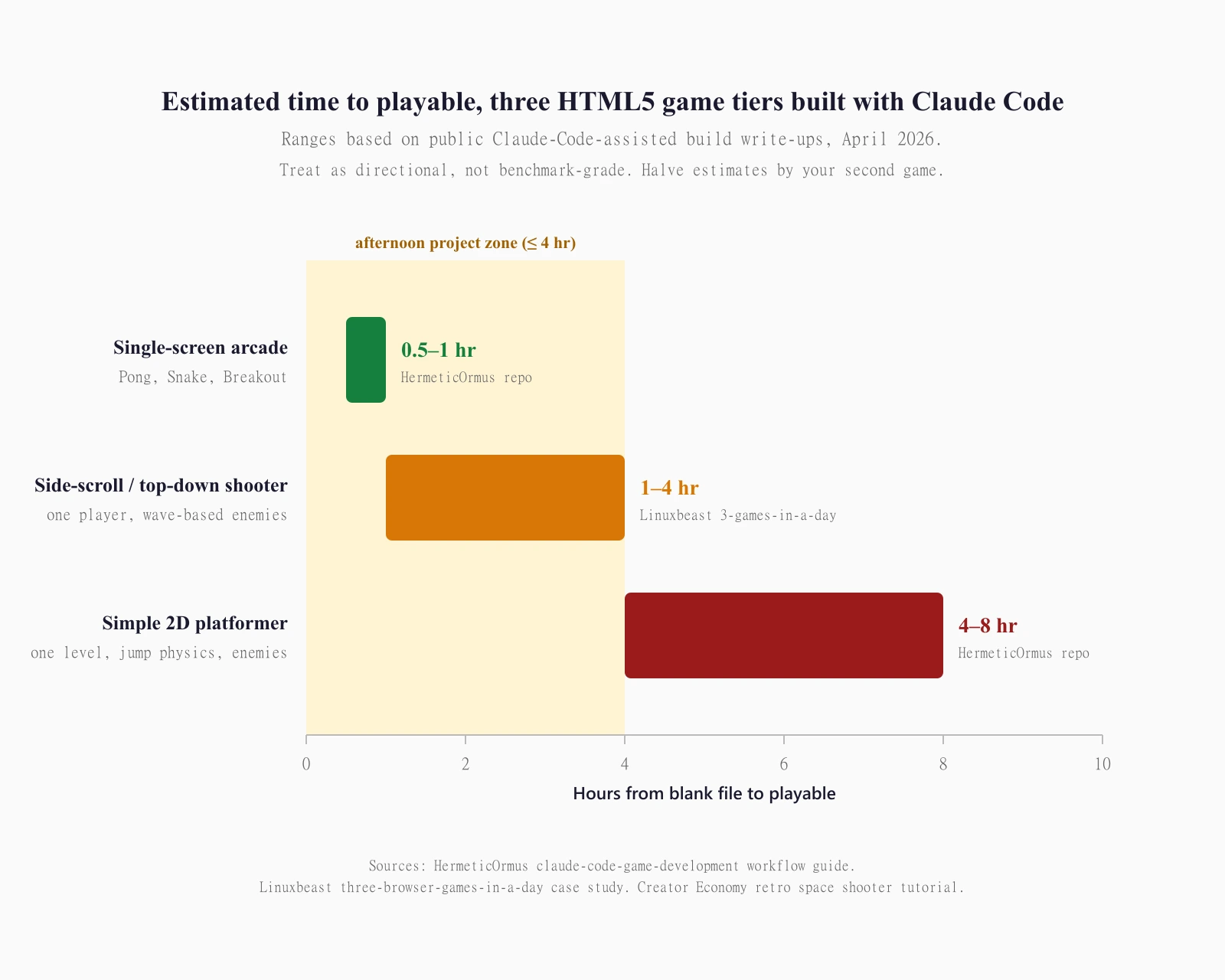
Build a simple HTML5 game with Claude Code in 30 minutes to about 4 hours, depending on complexity. Pick a single-screen arcade game like Pong, Snake, or Breakout for a 30-to-60 minute build, a side-scrolling shooter for the 1-to-4 hour range, or a simple platformer with jump physics and enemies for 4 to 8 hours. The stack is one HTML file with vanilla JavaScript and an HTML5 Canvas element, no game engine, no package.json, no build process. Deploy by uploading the file to a free static host like Cloudflare Pages or itch.io, or submit to a portal like CrazyGames or GameDistribution if the game is portal-shaped. The whole pipeline runs inside one terminal window.
| Portal | Audience reach | Developer revenue share | Submission terms |
|---|---|---|---|
| itch.io | Indie discovery, no traffic floor | Developer-set: commonly 90% (10% to itch) | Open upload, HTML5 accepted as URL or zipped build, non-exclusive |
| GameDistribution | ~350M monthly users across 4,000+ partner portals | 33% of net ad revenue | Non-exclusive accepted, EUR 100 payout threshold, paid 60 days after monthly report |
| CrazyGames | Large in-house portal | Base undisclosed; +50% revenue-share boost if you take 2-month launch exclusivity, run their SDK, and let them syndicate | Non-exclusive accepted; SDK + exclusivity unlocks the boost; EUR 100 monthly payout minimum |
| Poki | ~1,500 curated titles across ~600 active developers | 50/50 on Poki-sourced traffic; 100% on developer-sourced traffic | Curated, ~1 new game per day published; not an open-upload portal |
Which games actually work in an afternoon
The game has to be small. That sentence is the entire planning phase.
A single-screen arcade game (Pong, Snake, Breakout, asteroids in a fixed view) is the right starting point. One canvas. One game loop. Three or four entities on screen. No level design beyond the bricks-or-walls layout. MDN’s pure-JavaScript Breakout tutorial covers the entire mechanic set across ten lessons and asks for “basic to intermediate JavaScript knowledge.” With Claude Code typing, you supply the design judgement and Claude handles the math.
A side-scrolling or top-down shooter is the next tier. Wave-based enemies, a player ship, a few power-ups. The Linuxbeast write-up of three browser games built in a single day landed each (a side-scrolling space shooter, a naval combat game, a drone game) in three to four hours. Total output across all three: roughly 1,950 lines of vanilla JavaScript, no engines, no build step.
A simple 2D platformer is the difficulty cliff. The HermeticOrmus claude-code-game-development workflow guide pegs a complete platformer with multiple levels and enemies at four to eight hours. Jump physics, gravity, collision against arbitrary geometry, enemy AI, level loading: every one is a small problem Claude can solve, but the bug surface area goes up sharply. Build a one-screen platformer first if this is your first game.
Anything beyond that, like simulation, multiplayer, isometric, RPG, or puzzle games with a hundred handcrafted levels, is a different project. Phaser, Three.js, Babylon, real game engines. Out of scope for this guide, which is about getting a real game running in one sitting.
Setting up Claude Code for game development
Claude Code is Anthropic’s agentic coding tool: “reads your codebase, edits files, runs commands, and integrates with your development tools. Available in your terminal, IDE, desktop app, and browser.” The VS Code extension, the JetBrains plugin (IntelliJ IDEA, PyCharm, WebStorm), the desktop app, the web client at claude.ai/code, and the Slack integration all run the same engine. For a one-file HTML5 game, the terminal CLI is the lowest-friction surface.
Install once. macOS, Linux, or WSL: curl -fsSL https://claude.ai/install.sh | bash. Windows PowerShell: irm https://claude.ai/install.ps1 | iex. Make a project folder, cd into it, type claude. You are in.
About Agent Teams. Anthropic released the feature on February 5, 2026 alongside Claude Opus 4.6, and the docs describe it as a way to “spawn multiple Claude Code agents that work on different parts of a task simultaneously,” with a lead agent coordinating subtasks and merging results. The subagents documentation draws the line: “subagents work within a single session; agent teams coordinate across separate sessions.” For a Pong build, you do not need a team of agents. One Claude Code session in a terminal is the right tool. Agent Teams matter when the project has genuinely parallel tracks (separate server, client, art pipeline) that benefit from independent context windows. Bookmark it for later.
If you are weighing which Claude tier to subscribe to first, the real ranking of top frontier AI models for April 2026, beyond marketing headlines covers the Sonnet 4.6 vs Opus 4.7 vs Haiku 4.5 trade-offs that decide what a Pro vs Max subscription actually buys you.
The game specification prompt
The first prompt sets the ceiling. Vague gets you a generic Pong. Specific gets you the game you actually wanted to build.
Five elements, in this order:
Game type and core mechanic. “Pong, two-player, paddles on left and right, ball bounces between them, first to seven points wins.” Not “a Pong game.” Name the game and its win condition in one sentence.
Canvas and rendering. “One HTML file. 800 by 600 canvas element. Vanilla JavaScript, no libraries, no build step. All graphics drawn directly to canvas with fillRect, arc, and fillText calls.” This closes off the framework rabbit hole before Claude gets curious.
Controls. “Player one uses W and S keys. Player two uses arrow up and arrow down. Both paddles only move when their key is held.”
State and feedback. “Score displayed at the top centre. When a player scores, the ball resets to centre and serves toward the loser. Game ends at seven; show a winner screen with restart on spacebar.”
Look and feel. “Black background, white paddles and ball, white text in a monospaced font. Retro arcade aesthetic. No animations beyond the ball motion.”
That five-paragraph prompt produces a working Pong on the first run, in my experience and in the published case studies. Linuxbeast’s account of three browser games in a day has the strongest line on this: “The first prototype always worked. Every time I described a new game concept, Claude produced a working version on the first attempt.”
The prompt is not a story. The prompt is a spec. Write it like one.
Iteration loop, from prompt to playable
After the first run, the loop tightens. Open the generated HTML file in a browser. Play it. Notice what feels off. Ask Claude to fix it. Repeat.
A typical sequence for a single-screen arcade game runs eight to fifteen short turns; the Decrypt vibe-coding case study reports fourteen iterations to reach “something satisfactory.” The first turn fixes obvious bugs (ball goes through the paddle on fast hits). The middle turns tune feel (paddle accelerates from a stop, ball speed increases by 5% on each rebound, particle flash on collision). The last turns polish the failure modes (both keys held, window resizes, player tabs away and back).
Two patterns make this loop fast. First, run the game in a real browser tab kept open in the background, not the Claude Code terminal. Each fix appears in the file on disk; a hard refresh (Cmd-Shift-R or Ctrl-Shift-R) reloads it. Second, write feedback in physical terms. “The ball feels heavy” is hard for Claude to act on. “The ball moves at 4 pixels per frame; double it” is unambiguous.
If you have built a calculator website with Claude AI from prompt to deploy, the loop is the same shape. Specify, render, test, refine. Calculators stabilise faster because the math is fixed; games stabilise slower because “feel” is subjective and only revealed through play. The blocker, almost always, is your ability to describe what is wrong. The code is the easy part now.
Adding art with Nano Banana Pro
Honest framing first. Nano Banana Pro is Google DeepMind’s image generation and editing model, built on Gemini 3 Pro and launched November 20, 2025. It runs at up to 4K, blends up to 14 reference images, and renders legible text in multiple languages. Excellent for stylised illustration, infographics, splash art, and editorial-quality images. Not the right tool for crisp 8-by-8 or 16-by-16 pixel sprite sheets. The model’s strengths skew toward photorealism and high-resolution composition; the smallest, most pixel-precise asset class is the wrong shape for it.
Here is what to use it for in a game project:
Title screen and splash art. Generate a 1920-by-1080 hero image that captures the game’s tone, drop it in as a full-screen background on the start screen. One generation; one <img> tag.
Background layers. Generate two or three 1920-pixel-wide horizontal panoramas at different parallax depths. Translate them at different speeds in the canvas update loop. Instant depth.
Marketing art. Whatever you ship to itch.io’s listing page or social media wants a poster. Nano Banana Pro is sized for exactly this.
For in-game sprites, draw geometric shapes directly to the canvas. Pong’s paddles are two rectangles. Snake is a column of squares and an apple. Breakout is a grid of rectangles and a ball. Most single-screen arcade games ship without a sprite asset at all. Platformers and shooters that need character sprites are best served by a dedicated pixel-art tool (Aseprite, Piskel, LibreSprite); Claude Code wires the resulting PNGs into the asset loader.
For sound, the Web Audio API synthesises beeps, blips, and explosions in five lines of JavaScript. Ask Claude to add a playBeep(frequency, duration) helper and call it on collisions and scoring events.
Testing and debugging with Claude
The browser is the test environment. The console is the debugger. Claude does most of the work.
When something breaks, paste the console error into Claude Code with a one-line note about what you were doing. Claude reads the file, locates the function, applies the fix. Bugs that look intimidating to a human (“the wave score resets before being captured, leaving players with zero currency,” from the GonzoML two-evening browser-game build) become two-minute fixes once Claude has full code context and the exact error.
Three failure modes recur and are worth pre-empting:
Variable shadowing across the game loop. A score defined inside requestAnimationFrame does not persist between frames. The fix is to lift it to module scope. Ask Claude to audit for this after the first prototype.
Hidden integration bugs. The GonzoML build documented “15 dead flags” in pedestrian data that were never checked by code, and an aurora power-up that shared freeze logic with frost. Run an explicit audit prompt: “Read every state mutation in this file. List anything set but never read, or read but never set.” Claude is good at this; it just needs to be asked.
Off-by-one collision math. The ball goes through the paddle on a fast frame. The fix is continuous collision detection (sweep the ball’s path between frames) rather than instant collision (check at end of frame). Claude knows the technique; you tell it the symptom.
If the bug refuses to die, give Claude permission to add console.log statements at every relevant step, run the game, and report what fired and what did not.
Deploying your game
Two paths. Pick by audience.
Path A: Cloudflare Pages, your own URL. Drop the index.html file into a Cloudflare Pages project, get a https://yourgame.pages.dev URL in under two minutes. The free tier ships unlimited bandwidth, 500 builds per month, up to 20,000 files per site at 25 MiB per file, and 100 custom domains per project. Best when you want the game on your own domain with full control over analytics, ads, or calls to action.
Path B: itch.io, the indie discovery layer. Sign up at itch.io, click “upload new project,” set the project type to “HTML5 game.” You can paste the URL of a game already hosted on Cloudflare Pages, or upload a zip of the HTML files directly. itch.io’s revenue model is open: you choose what percentage (commonly 10%, with 0% or 30% as alternative options) goes to the platform. Best when you want discovery on a real games marketplace without negotiating a contract.
Submitting to GameDistribution, CrazyGames, or Poki is a separate motion. The portal table at the top of this guide is the short answer. The longer answer: portals want games that fit their audience and ad-monetisation model. Pong on a portal is unlikely to land; a polished one-screen casual game with sixty seconds of playable loop is exactly the shape they want.
Furze’s Claude Code workflow notes apply to deployment too. Plain-English commands handle the boring parts: “Initialise a git repo, create a GitHub repository called my-new-site, and push the code.” His content-website build clocked in at exactly 23 minutes end-to-end, with most of those minutes on manual domain transfer rather than code.
Monetization, honestly
Three models. Each trades reach for revenue per player.
Portal display ads. Submit to GameDistribution, CrazyGames, or Poki. They run rewarded video ads and interstitials around your game and pay out a share of ad revenue. GameDistribution publishes its share at 33% of net. CrazyGames does not publish a base figure but documents a 50% revenue-share boost for developers who take a two-month launch exclusivity, run the CrazyGames SDK, and let CrazyGames syndicate. Poki splits revenue 50/50 on traffic from poki.com but lets developers keep 100% of revenue from users they bring themselves through bookmarks, search, or social. Best for casual, replayable games with strong session-length numbers.
itch.io paid downloads or pay-what-you-want. itch.io lets you sell directly, set your own price (or zero), and configure the platform’s cut. Common setting is 10% to itch.io, 90% to you. Best for games with personality that an indie audience will pay $3 to $10 to own.
Owned-domain ads or sponsorships. Host on your own URL via Cloudflare Pages, run AdSense or a direct sponsor. Revenue per thousand pageviews depends on traffic geography and session length more than on game quality. Best when you already have an audience to point at the game.
What none of these tell you up front: getting traffic is the hard part. The game itself is the easy part now. itch.io has a discovery surface, but most uploads see zero traffic outside the developer’s own posts, and the better portals are selective. Pick a niche where you have a distribution edge (a community, a topical hook, a keyword nobody good has bothered to claim) before you spend a Saturday on the build.
Frequently asked questions
Do I need a game engine like Phaser, Three.js, or Babylon for an HTML5 game?
Not for the games this guide covers. Vanilla JavaScript with the HTML5 Canvas API handles single-screen arcade games, simple platformers, and basic shooters cleanly, with no dependencies, no build step, no node_modules. Phaser is worth reaching for once your game grows into multi-scene flows with a built-in physics engine, scene manager, and tween system; Three.js and Babylon are for 3D. Start vanilla. Switch when you actually hit the wall, not before.
Will my HTML5 game run on phones and tablets without an app store?
Yes. The Canvas API has Baseline Widely Available status per MDN and has worked across browsers since July 2015. Caniuse.com scores Canvas basic support at 100, spanning desktop Chrome, Edge, Firefox, Safari, Opera, and all modern mobile browsers. The game runs by URL on iPhone Safari, Android Chrome, iPad, desktop, and any browser shipped in the last decade. No App Store review, no Play Store fees.
How long should a first HTML5 game build actually take?
Plan for 30 minutes to 1 hour for a single-screen arcade game (Pong, Snake, Breakout) and 1 to 4 hours for a side-scrolling shooter, per public Claude-Code case studies (HermeticOrmus repo, Linuxbeast three-games-in-a-day, Creator Economy retro shooter). A simple platformer pushes 4 to 8 hours. Halve those estimates by your second game.
Do I need Claude Pro or Max, or does Free work?
Claude Code requires Pro or Max as of April 2026. Free does not include it. Pro is the right tier for one or two games a month; Max is for heavier workloads. The Claude.ai web Artifacts feature works on Free for one-shot calculator-shaped projects, but a game iteration loop benefits from Claude Code’s file-editing-in-place workflow.
Can I sell the game I make this way?
Yes. itch.io supports paid HTML5 games with a developer-set platform share. Steam supports HTML5 games via Electron wrappers. The portals (GameDistribution, CrazyGames, Poki) are ad-monetised rather than paid-download channels. Pick the storefront by your audience, not by your tooling.
How do I add multiplayer to a Claude-Code-built HTML5 game?
You will need a backend. The simplest path documented in public case studies is the SpacetimeDB Claude Code build that produced an agar.io-style multiplayer game in 30 minutes of prompting, using SpacetimeDB on the server and a Phaser+React client. For a vanilla Canvas game, WebSockets via a small Node or Bun server is the standard answer. Multiplayer doubles the project’s surface area; ship single-player first, then add the network layer.
What about Agent Teams? Should I use them for a game build?
Probably not, for a first game. Anthropic’s docs draw the line clearly: “subagents work within a single session; agent teams coordinate across separate sessions.” Agent Teams matter when the project has genuinely parallel tracks that benefit from independent context windows. A Pong file is one canvas and one game loop. Use a single Claude Code session for the first game; reach for Agent Teams when the project genuinely splits.